MeshCore
- 4.5
- Rating
- 50.00K
- Installs
- Free
- Price

 Analysis by App-foxy
I approached MeshCore as a communication tool rather than as another ordinary messaging app. Its purpose is tied to the MeshCore ecosystem, so the experience feels more specialized than the familiar pattern of opening a chat, choosing a contact, and sending a message through the internet. That focus is both its appeal and its main limitation: the app can make sense for people who already use compatible mesh equipment, while it may feel confusing or incomplete if you expect a standalone replacement for Signal, WhatsApp, or SMS.
Developed by Liam Cottle, this free Android app is listed for Everyone and has reached more than fifty thousand installs. Its average rating is 4.5 from roughly five hundred ratings, which suggests a generally positive reception without making the app look like a mass-market communication platform. I tested it with an accessibility-minded question in mind: can someone with different reading, motor, sensory, or situational needs understand what is happening and complete the basic tasks without unnecessary effort?
My short answer is that MeshCore is most promising when the user already understands the mesh concept and has a practical reason to communicate outside normal cellular or internet coverage. It is less immediately welcoming for newcomers, people who need very polished onboarding, and anyone looking for a conventional chat application. The current version is 1.49.0, and the app supports Android 7.0 or later, so it remains available to people using older Android devices.
You May Also Like

 Blood Strike: 2.5 Anniversary
Blood Strike’s Loadouts Turn Every Drop Into a Tactical Gamble
A close look at Blood Strike’s custom loadouts: how fast access to signature weapons reshapes its battle royale rhythm, rewards preparation, and narrows the gap between fights.

 Pandora - Music & Podcasts
Pandora’s Music Is Easy to Start, but Harder to Recover
Pandora’s strength is its low-effort path from a seed to a station. Its weak spot is how much confidence it asks you to place in connection, setup, and quiet recovery.

 8 Ball Pool
 Is Built on Rivalries, Rematches, and Routine
A close look at the rivalries, rematches, shared routines, and unanswered safety questions that turn a quick pool match into a persistent mobile community.

 Samsung Music
’s Quiet Strength Is Playing What You Already Own
Its reach comes less from spectacle than from dependable access to a personal library. That simplicity is both the app’s strongest retention engine and its ceiling.

 AccuWeather: Weather Radar
AccuWeather Review: A Quick, Clear Forecast for Everyday Decisions
For everyday plans, the best forecast is the one you can understand quickly. AccuWeather makes rain timing, radar, and local conditions easy to act on, with a few trade-offs.

 Hill Climb Racing
Why Hill Climb Racing Still Turns Crashes Into One More Run
A tiny car, a bumpy hill and one more upgrade: Hill Climb Racing keeps resurfacing because its simple chaos makes every near-miss feel personal.
More From Our News Desk
View All News


How MeshCore handles readability and navigation
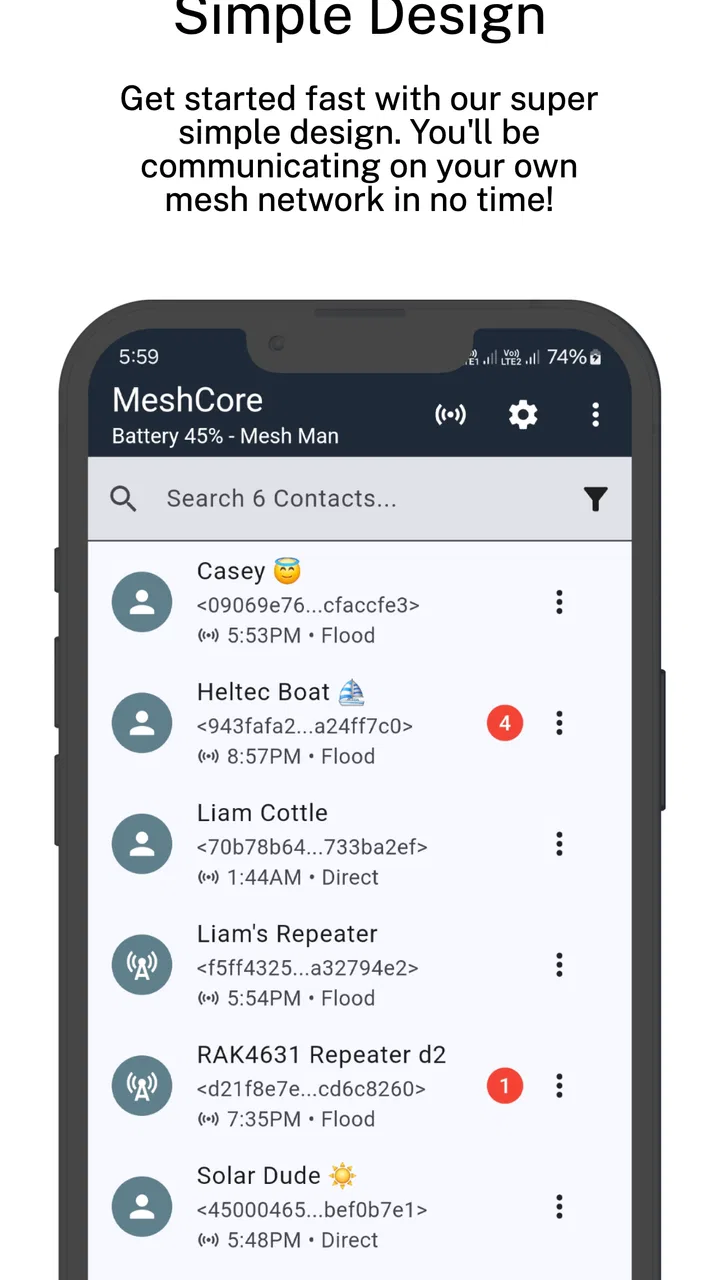
I find readability in MeshCore depends less on how much is on screen than on whether the user understands the mesh context behind it. In this section, I look at how to make the interface easier to scan and how a steady navigation routine can reduce the effort of checking messages and connection details.
A focused interface, but not a familiar one
The first thing I noticed is that the app’s clarity depends heavily on context. In a standard messenger, labels such as chats, contacts, calls, and settings carry familiar meanings. A companion app for MeshCore has a different job: it helps the phone interact with a mesh communication setup. That means a new user cannot rely entirely on habits learned from mainstream messaging apps.
For an experienced user, this focused design can be an advantage. There are fewer distractions from unrelated social features, advertising feeds, or entertainment panels. The app is not trying to turn communication into a large platform. I found that refreshing because it keeps the attention on the connection and the information being exchanged.
For someone with cognitive fatigue, limited technical confidence, or difficulty building a new mental map of an interface, the same focus can create friction. The important question is not only whether an option exists, but whether its purpose is obvious before it is selected. MeshCore is easier to approach when the user already knows what a mesh companion should do and what the connected setup is expected to provide.
Reading messages in real situations
Text-based communication is naturally useful for people who prefer reading over listening, need to communicate quietly, or want to review information at their own pace. A written exchange also gives a user time to reread a message before responding, which can help when concentration, memory, or language processing is affected.
That benefit should not be confused with perfect readability. Text can still become difficult when the phone is small, lighting is poor, or the user needs unusually large controls and lettering. I would recommend checking the phone’s own display and accessibility settings early, rather than waiting until the app becomes uncomfortable to use. System-level adjustments can make a bigger difference than changing the communication workflow itself.
I also think message context matters more here than it does in a casual chat. When communication depends on a mesh arrangement, a user may need to understand whether the phone is connected as expected and whether a message has moved through the intended path. Someone who skims every screen may miss an important status clue. Reading the interface carefully at the beginning is worthwhile, especially before relying on it during travel or an outage.
Navigation habits that reduce effort
My practical advice is to learn the app in a calm place, with the relevant MeshCore hardware available and enough time to repeat the main actions. Trying to discover everything during an emergency is a poor accessibility strategy. I would first identify where the connection state, contacts or destinations, message history, and configuration controls are located. Then I would send a test message and confirm how the app presents the result.
This kind of rehearsal is especially useful for users who depend on predictable routines. It reduces the number of decisions required later and makes it easier for a helper, family member, or teammate to explain the same process consistently. The app is not necessarily difficult because of the number of screens; it is difficult when the user has not yet formed a clear relationship between the phone, the companion app, and the mesh network.
One non-obvious trade-off is that a less crowded interface can still demand more technical interpretation. A mainstream messenger may contain more visual clutter but offer familiar labels and automatic assumptions. MeshCore appears to exchange some of that familiarity for a narrower, more purposeful role. People should choose based on which kind of effort is easier for them: filtering distractions or learning a specialized workflow.
Motor, sensory, and situational access
Accessibility also depends on the conditions in which someone holds and uses the phone, not just on text and menus. I’ll consider practical ways to reduce repeated hand movements and account for visual, hearing, and sensory needs, then turn those points into a realistic group-use example.
Reducing precise actions
For users with tremors, reduced dexterity, joint pain, or one-handed phone use, the most important issue is how many precise actions are required in sequence. A communication tool becomes more usable when a person can reach the needed control without repeated tapping, awkward gestures, or tiny targets. I would use the app with the phone positioned securely rather than trying to operate it while walking, carrying equipment, or wearing thick gloves.
That recommendation is not a criticism unique to MeshCore. It reflects the reality that a companion app may be used alongside physical hardware, cables, or a portable radio-style setup. The phone is only one part of the task. A user with limited hand movement should test the complete sequence: waking the device, opening the app, checking the connection, selecting the destination, composing the message, and confirming what happened. A workflow that feels acceptable in isolation can become tiring when every step is repeated.
Voice input from the Android keyboard may help users who find typing difficult, although it should be treated as a convenience rather than a guaranteed solution for every environment. In a quiet room it can reduce finger movement; in a crowded or sensitive situation it may be impractical. Short, preplanned messages can also reduce effort, particularly when the user needs to communicate recurring information such as location, condition, or a request for assistance.
Visual and auditory considerations
MeshCore is primarily relevant to people exchanging written information, which can suit users who are deaf or hard of hearing and those who prefer not to depend on sound. It can also work better than a voice call when the surrounding environment is noisy or when speaking would reveal the user’s location. That is a meaningful situational strength.
At the same time, a text-first workflow places more responsibility on visual presentation. Users with low vision should consider whether the phone’s magnification, font scaling, contrast, and screen reader settings make the interface comfortable. I would not assume that every control or status message will be equally easy to interpret with assistive technology. The safest approach is to perform the whole setup and message cycle using the accessibility configuration the person will actually use later.
Users with sensory sensitivities may appreciate avoiding the constant alerts and social activity found in larger messaging services. A specialized companion app can feel calmer because it is not competing for attention with feeds, calls, stickers, and promotional prompts. However, a quiet interface can also make a status change easier to overlook. If a user cannot rely on sound or vibration, visual checking needs to become part of the routine.
A realistic everyday scenario
Consider a small hiking group moving through an area where ordinary mobile service is unreliable. One member has limited hearing and prefers written communication, while another has difficulty typing quickly. Before leaving, they could agree on a few short message patterns, test the MeshCore connection, and decide who will monitor incoming updates. The first person benefits from text rather than voice, and the second avoids composing long messages under pressure.
The important detail is preparation. MeshCore is not most accessible when treated like an app that can be installed at the last minute and understood immediately. It becomes more manageable when the group assigns simple roles, rehearses the message flow, and keeps the wording concise. This also helps users with anxiety or memory difficulties, because they do not have to invent a process while dealing with poor coverage or changing conditions.
Access beyond the home
The app’s strongest situational argument is that it belongs to a communication system designed around mesh connectivity rather than ordinary internet messaging. That makes it interesting for outdoor groups, event teams, remote work sites, and people planning for circumstances in which cellular access may not be dependable. The value is not that it replaces every other communication method, but that it can occupy a different place in a communication plan.
That distinction matters for accessibility. A person who cannot easily travel to a service area, recharge equipment, or troubleshoot a connection may need a simpler fallback. MeshCore can be useful as one layer of a plan, but I would not make it the only method for someone whose safety depends on immediate, universally understood communication. Keep another agreed method available when the situation requires it.
Remaining barriers and practical trade-offs
The largest barrier is conceptual rather than visual. A normal messenger hides most of the underlying network. MeshCore asks the user to think more about the connection itself. That can be empowering for technically confident people, but intimidating for someone who expects the phone to handle everything automatically.
There is also a hardware dependency in the overall experience. Even if the app is free to download, the usefulness of a companion app depends on having the compatible MeshCore arrangement and understanding how the phone participates in it. The app should therefore be judged as part of a system, not as a self-contained chat service. Someone wanting instant conversations with friends who use ordinary phones will probably have a smoother experience with a conventional internet messenger.
Another point to consider is support effort. When a mainstream app fails, many friends or family members may already know the basic troubleshooting steps. With a specialized mesh companion, the helper also needs to understand the network context. For users who rely on another person for setup, I recommend creating a short written guide with the exact sequence for connecting, checking status, and sending a test message. That guide can be more useful than asking for help in the middle of a stressful event.
The in-app purchase price is listed as $7.99 per item, so users should think about which optional purchases, if any, are genuinely relevant before spending money. I would first establish that the core workflow fits the person’s needs and that the surrounding hardware is suitable. A paid addition cannot solve a mismatch between the user’s expectations and the specialized purpose of the app.
MeshCore is also not the right choice for every communication style. If you need rich media sharing, broad social compatibility, effortless group adoption, or a familiar interface for people who are not technically inclined, a mainstream messenger will likely be better. If your priority is written communication within a MeshCore-based setup and you are willing to learn the connection model, this app has a more convincing reason to exist.
My inclusive verdict
I see MeshCore as a focused communication companion with meaningful value for a specific audience. Its text-oriented nature can support deaf and hard-of-hearing users, people who prefer quiet communication, and anyone who needs messages that can be reread instead of heard once. Its availability on older Android versions also gives it a broader device reach than an app restricted to newer phones.
Its accessibility is less convincing when judged only by immediate simplicity. The user may need to understand specialized terminology, coordinate with compatible equipment, and verify the state of a mesh connection. Those requirements can be manageable for a prepared team but burdensome for someone with cognitive, motor, or visual needs who expects a conventional chat experience.
My recommendation is to treat the app as a planned communication tool. Install it, connect the intended setup, enlarge or simplify the phone’s display as needed, and run several short tests with the people who will actually use it. Pay attention not just to whether a message can be sent, but to whether every person can recognize the connection state, recover from a mistake, and complete the process without rushing.
For me, that is the fairest way to assess the Official MeshCore Companion App. It is not a universal messenger, and it should not be sold to yourself as one. It is a specialized option whose accessibility depends on preparation, compatible equipment, and the user’s comfort with a less familiar communication model. When those pieces fit, it can offer a useful alternative to internet-dependent chat. When they do not, a simpler mainstream app remains the kinder choice.
With a free entry point, an Everyone age classification, and a current release of 1.49.0, it is reasonable for interested users to try the workflow before deciding whether it belongs in their communication plan. I would recommend it to mesh enthusiasts, outdoor or remote teams, and users who value written, infrastructure-independent communication. I would skip it for casual everyday chatting or for anyone who needs immediate, effortless accessibility without a learning period.
FAQs for MeshCore
01What is MeshCore and what is it used for?
MeshCore is a communication application designed to support messaging over compatible mesh-radio hardware rather than relying entirely on cellular networks or Wi-Fi. It is mainly intended for off-grid communication, outdoor activities, emergency preparedness, and areas with limited coverage. The app works as part of a wider MeshCore setup, so users generally need supported hardware and must configure the connection before sending or receiving messages.
02Does MeshCore work without internet or mobile phone service?
One of MeshCore’s main advantages is its ability to communicate through a mesh network when traditional internet or mobile service is unavailable. However, the app itself does not magically provide connectivity on its own. You need compatible radio equipment, sufficient battery power, and nearby nodes or relays within range. Performance depends on terrain, antenna placement, radio settings, network density, and local environmental conditions.
03What devices and hardware are compatible with MeshCore?
Compatibility depends on the specific MeshCore version and the radio hardware supported by the project. In practice, users should check the official documentation or the app listing before downloading, because not every Android or iOS phone can communicate directly with every mesh device. You may need a compatible LoRa-based node, Bluetooth or USB connectivity, suitable firmware, and permissions for nearby-device communication.
04Is MeshCore difficult to set up for a first-time user?
MeshCore can be approachable once the hardware is prepared, but it is more technical than a typical messaging app. New users may need to install or update firmware, pair the phone with a node, grant Bluetooth or location permissions, select radio parameters, and understand how routing works. Reading the official setup instructions carefully is recommended, especially because incorrect regional radio settings or unsupported hardware can prevent reliable communication.
05Is MeshCore secure and private for sensitive conversations?
MeshCore may offer useful privacy features depending on the version, network configuration, and messaging mode, but users should not automatically treat it as a replacement for a professionally audited secure-messaging service. Security can depend on encryption implementation, device firmware, key management, relay behavior, and how the network is configured. Avoid sharing highly sensitive information until you have reviewed the current documentation and understand the app’s limitations.
Pros
- Works without cellular networks or internet access
- Supports long-range communication through mesh relays
- Useful for outdoor trips and emergency situations
- Can extend coverage as more compatible nodes join
- Designed for low-power operation on supported hardware
Cons
- Requires compatible MeshCore hardware to function fully
- Range depends heavily on terrain
- node placement
- and antenna quality
- Fewer users may mean limited coverage in your area
- Initial setup can be technical for beginners
- Messages may be delayed when routed through distant nodes

MeshCore
Gallery